
Android Instructions
- Open your preferred browser
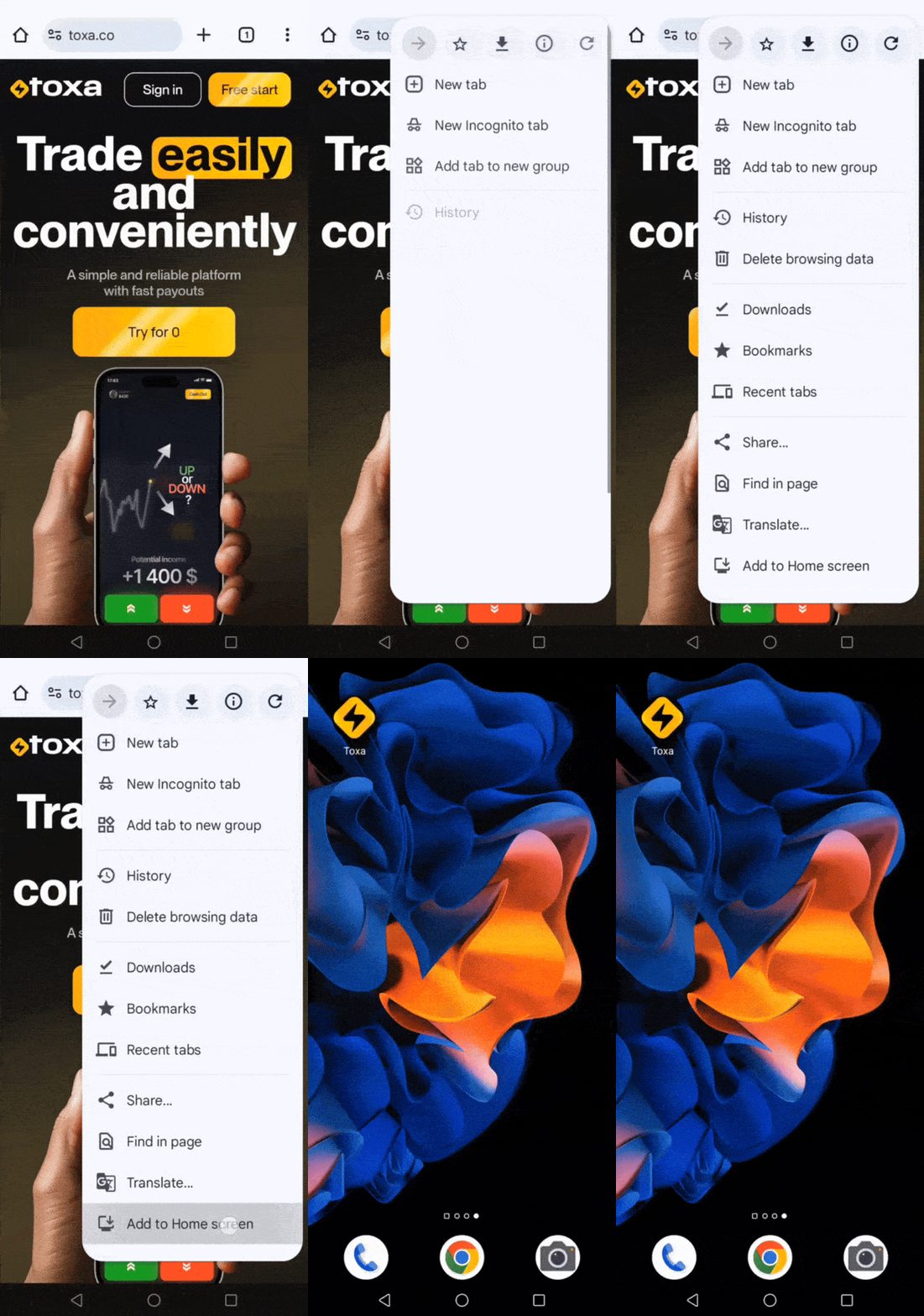
Chrome or the web browser that comes pre-installed on your device is best. - Open the browser settings menu.
Tap the “ellipsis” icon that opens the page settings in the browser - Click on “Add to Home Screen“
Tap on “Add to Home Screen“ - Confirm adding
In the pop-up windows, confirm adding to the main screen by clicking on “Add“
Trading Apps for Android
Trading is a popular way to participate in financial markets by analyzing price movements of various assets. Today, many trading apps for Android make this process more accessible, convenient, and efficient for users.
Best Trading App for Android
When choosing a trading app for Android, it is important to consider the following factors:
- Reliability and reputation of the platform
- Licensing and regulation
- Variety of available assets
- Ease of use
- Availability of educational materials
- Demo account for practice
- Convenient funding and withdrawal methods
The Toxa mobile app meets all these criteria. Keep in mind that trading financial instruments involves risks, so it is important to follow a well-planned capital management strategy. Trading can generate significant profits, but it may also result in capital losses, so careful consideration of strategies and investments is essential.
Why choose our app?
Toxa is a modern online trading app designed to help users efficiently manage their investments and access a wide range of financial market assets. We provide training and personal support regardless of your trading experience. The app allows you to monitor the market in real time and manage trades conveniently. Invest in your future with Toxa and improve your financial results.
How to start using the Toxa app on Android:
To set up the Toxa app on Android, follow these steps:
- Open your browser (we recommend Chrome or any other browser installed on your smartphone).
- Go to the browser settings menu.
- Tap the icon with three dots to open page options.
- Select “Add to Home Screen.”
- Confirm your choice.
- In the pop-up window, click “Add.”
After completing these steps, the Toxa app will appear on your home screen. This provides quick access to the platform and makes online trading more convenient and efficient. With the app, users can easily access important information, monitor markets, and manage trades in just a few taps.
Conclusion
The Toxa mobile platform is a powerful online trading app for Android that offers users extensive opportunities to participate in financial markets. It helps traders analyze the market, develop strategies, and make informed decisions to achieve their financial goals.